
In parts 1 and 2 we created and updated DimContestant
In Part 3 we created DimTask, DimEpisode and DimDate
Its time to create the fact table. the first thing we need to do is to get an understanding of what Facts we have and how they would join to the data we have created in the dims so far.
Lets create a notebook.

%%configure
{
    "defaultLakehouse": {
        "name": "DebbiesFabricLakehouse"
    }
}
Adding possible csvs into DataFrames
Attempts
#Read the first file into a dataframe
dfattempts = spark.read.format("csv").option("header","true").load("Files/Data/Bronze/attempts.csv")
# dfattempts now is a Spark DataFrame containing CSV data from "Files/Data/Bronze/attempts.csv".
display(dfattempts)
Contains points and ranks and appears to be at the episode and contestant level
episode_scores
#Read the file into a dataframe
dfepsc = spark.read.format("csv").option("header","true").load("Files/Data/Bronze/episode_scores.csv")

display(dfepsc)
episode_scores is new to this project but seems a really good data set. Holds scores and Ranks at the episode and contestant level (but not at task level)
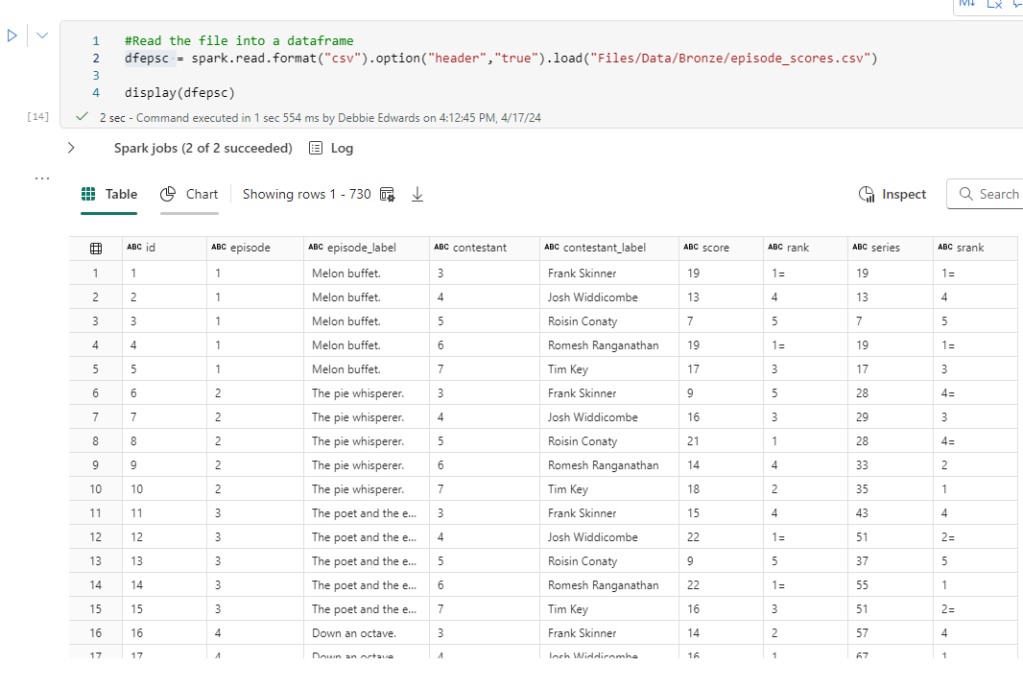
we actually don’t need this because its just aggregated data. We can remove this from our transformations. Power BI will aggregate for us
episodes
#Read the file into a dataframe
dfepis = spark.read.format("csv").option("header","true").load("Files/Data/Bronze/episodes (1).csv")

display(dfepis)
This contains Dates and points. However the Scores are at Episode Level. We will be able to get this information from DAX, summing the individual Scores so we don’t need the scores at all. All we are interested in is the air date.
Lets look at the row counts
ct = dfepsc.count()
print(f"dfepsc: {ct}")

ct = dfepis.count()
print(f"dfepis: {ct}")

ct = dfattempts.count()
print(f"dfattempts: {ct}")
the number of columns vary. We need to make sense of what we have

Create the data we need from attempts
# Select multiple columns with aliases
dfdfattemptsf = dfattempts.select(
    dfattempts.task.alias('attTaskID'), #Join to DimTask
    dfattempts.task_label.alias('attTask'),
    dfattempts.episode.alias('attEpisode'),
    dfattempts.series.alias('attSeries'),
    dfattempts.contestant_label.alias('attContestant'), #Join to DimContestant
    dfattempts.points.alias('attPoints')
).distinct()

# Show the resulting DataFrame
display(dfdfattemptsf)
The Points in Attempts are the best ones we have at the moment because the Task csv was empty.
we are clearly now hitting real data problems and in a normal project we would be going back to the team creating the data to get them to resolve the problems.
Filter attempts
the attempts is our main table but we could do with the episode and Series information working with our dimensions we have and we only have Ids for both
Are episode and series related with the correct IDs? Lets do some filter queries to look at series 1, episode 1.

After a few filtered queries, there is clearly a some data issues, or unknowns that I am not aware of. With attempts. The episode 1 and series 1 doesn’t match the contestants and tasks (I know because I watched it).
For episodes (1) (Above) we do have the correct information for episode and series. But we aren’t using these to get data.

More problems with Episode Scores. Episode appears to be correct. But the series ID is completely different so we cant match on this. But we aren’t using this data any more.
We need to look at our PARQUET file DImEpisode
The first thing we need to do is Load our DimContestant PARQUET data back into a dataframe and to to this, we have to update the code slightly as previously we have loaded in csv files.
# Read Parquet file using read.parquet()
dfdimep  = spark.read.parquet("Files/Data/Silver/DimEpisode.parquet")
display(dfdimep)
To Get the path, Click on you File in the Files Folder in the Lakehouse and Copy ABFS Path, Copy Relative path for spark gives you a more concise path

We are now using the silver layer of the medallion architecture in the path. All our bronze landing data has been transformed.
Are our IDs correct in the Dim for Attempts, or for the Tasks by Objective csv?

Now we have a real issue. Our Episodes cant join to attempts.
Join with one Condition
We can join episode Scores to Episode first via the episode name? This would be an issue if you have repeating episode names in Series, but we are lucky that this is not the case.
# condition
original_condition = dfepis["title"] == dfepscf["scEpisode"]

# Now perform the left outer join
dfEpScorej =  dfepis.join(dfepscf, on=original_condition, how="full").drop(dfepscf.scEpisode)

display(dfEpScorej)

Filter new transformed table for episode 1 series 1
import pyspark.sql.functions as F

filtered_df = dfEpScorej.filter((F.col('episode') == 1) & (F.col('series') ==1))
display(filtered_df)
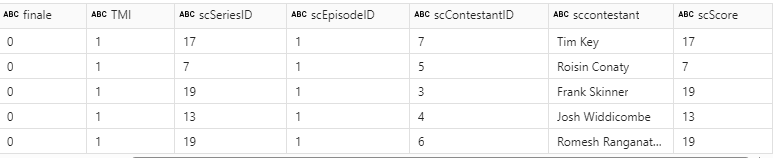
Filtering on Task 1 Season 1 gives us all 5 contestants against the episode. There are lots of columns we can remove. For example, we don’t need to hard code the winner. This can be done via Power BI DAX. So, the above join will be slightly updated with .drop.
# condition
original_condition = dfepis["title"] == dfepscf["scEpisode"]

# Now perform the left outer join
dfEpScorej =  dfepis.join(dfepscf, on=original_condition, how="full").drop(dfepscf.scEpisode)\
.drop(dfepscf.scEpisodeID).drop(dfepis.winner).drop(dfepis.winner_label).drop(dfepis.studio_date).drop(dfepis.winner).drop(dfepis.finale).drop(dfepis.TMI)

display(dfEpScorej)


Full is being used as the join because we want each side even if they haven't been joined.
Use dfEpScorej now instead of dfepis and dfepscf
We have the attempts (dfattemptsf) left
So how can we join this final table?
- We can’t join by Task because Episodes doesn’t include task
- We can’t join by Series because the Series IDs don’t match and neither does Episode.
- We can match by Contestant but Contestants can take part in multiple series so the join doesnt work
As it stands we cant actually match in this table so we need to go with Episodes and Scores for the fact table.
Add the Dimension Keys into the transformed table
Join DimContestants Via Contestant Name
We Can’t use ID but we can use name.
Also when we join we only want the Key and we can immediately remove everything relating to Contestant.
# Original condition
original_condition = dfdimcont["contestant"] == dfEpScorej["sccontestant"]

# Adding another condition based on the 'name' column
#combined_condition = original_condition & (dfdimcont["contestant"] == dfEpScorej["sccontestant"])

# Now perform the left outer join
dfEpScorej = dfEpScorej.join(dfdimcont, on=original_condition, how="left")\
.drop(dfdimcont.TeamName).drop(dfdimcont.teamID).drop(dfdimcont.age).drop(dfdimcont.gender)\
.drop(dfdimcont.hand).drop(dfdimcont.ageRange).drop(dfdimcont.dob)\
.drop(dfdimcont.contestant).drop(dfdimcont.contestantID)\
.drop(dfEpScorej.sccontestant).drop(dfEpScorej.scContestantID)

display(dfEpScorej)
If we have any null values they can be replaced with -1
But first we can check if any exists
dfEpScorej.filter(dfEpScorej.ContestantKey.isNull()).show()
fillna to replace null with a value
Even though we have none at the moment, there could be some in the future so fillna allows us to replace with our Default keys
dfEpScorej = dfEpScorej.fillna(-1, subset=[“ContestantKey”])
dfEpScorej.show()
Add Episode Key
All is good. we can join it into the transformed table. Removing everything but the key using .drop
the data was checked that it was ok before adding all the .drop’s into the code,
# Original condition
original_condition = dfdimep["seriesID"] == dfEpScorej["series"]

# Adding another condition based on the 'name' column
combined_condition = original_condition & (dfdimep["episodeID"] == dfEpScorej["episode"])

# Now perform the left outer join
df = dfEpScorej.join(dfdimep, on=combined_condition, how="left")\
.drop(dfdimep.episodeTitle).drop(dfdimep.episodeID).drop(dfdimep.series).drop(dfdimep.seriesID)\
.drop(dfEpScorej.series_label).drop(dfEpScorej.series).drop(dfEpScorej.episode).drop(dfEpScorej.title)

display(df)

Set Key to -1 if NULL
dfdimtask = dfdimtask.fillna(-1, subset=["taskKey"])
dfdimtask.show()
Conclusion
This specific project has been abandoned because the data doesn’t give me what I need join wise to create the star schema. Mostly because there is clearly a main table with missing data.
But, I can’t wait to take what I have learned and try again with another data set.
Parts 1 to 4 have given me some great insight into analysis transforming and modelling with Pyspark.
 Debbies Microsoft Power BI, SQL Fabric and Azure Blog