
Lets have a look in a little more detail at the Settings for the DevOps Organisation Level and at what the Organisation is.
When setting up DevOps, it created at Organisation level of [My Name] , and another Organisation was then created manually for the company

Organisations can be treated as accounts and each organisations has its own URL. You will also hear organisations being called Collections
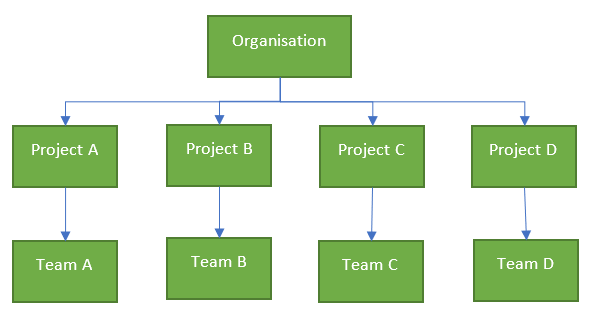
You must always start with one organisation but you can have multiple.
Go to Organisation Settings

General
Overview
This gives you the overview of the Devops organisation and there are a few options in here to be aware of
Privacy URL
Your Privacy URL can be added here to link to your organisations document describing how we handle internal and external guest data. If you have a public website or app you are required to have a dedicated Privacy policy URL.

Q Do you have a privacy document already in place?
https://www.freeprivacypolicy.com/blog/privacy-policy-url/
Organisation Owner
the owner is set against the person who created the organisation account but this can be changed.
Projects

New Projects can be set up here. See https://debbiesmspowerbiazureblog.home.blog/2020/03/06/create-a-devops-project/
Users

A good area to find out the Access levels for each user
- Stakeholder: Partial access and can be assigned to unlimited users for free
- Basic: Provides access to everything but test plans. Up to 5 users free, then £4.48 per month
- Basic + Test Plans: Includes test plans. £38.76 per month
- Visual Studio subscription: For users with a Visual Studio Subscription and features are enabled based on Visual Studio Enterprise, Professional Test Professional or MSDN Platform
Group Rules
DevOps includes group based licensing for Azure Active Directory (Azure AD) Groups and Azure DevOps groups.
Azure Active Directory Groups are created in Azure Active Directory
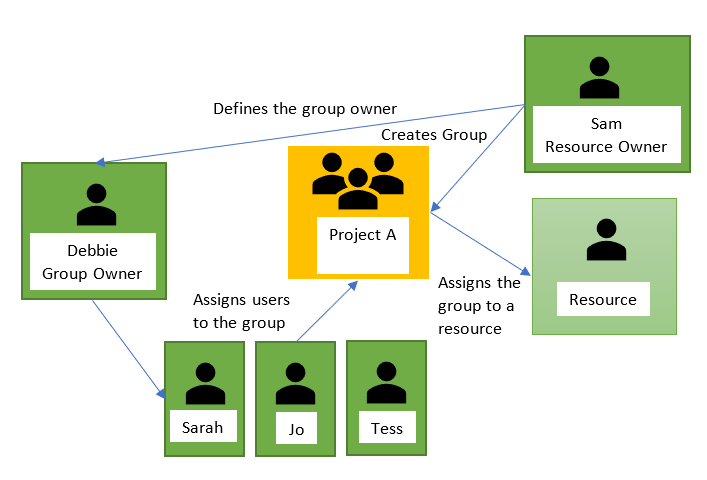
DevOps Groups and Collection Level Groups can be found within the Permissions section so we can look at this in more detail later.
Add a group Rule to assign an access level or extention to the group and resources in Azure DevOps are assigned to all members of the group.
When users leave a group the licenses are freed and returned to your pool.
Imagine this scenario
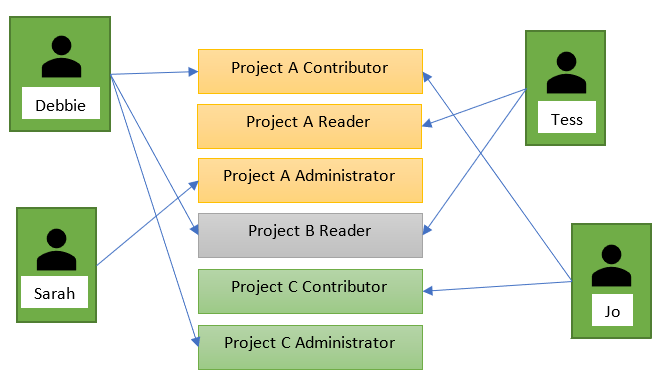
It will be easier to add the following Groups
- Project A Contributor Group and add Debbie and Jo
- Project A Reader Group and add Tess
- Project A Administrator Group and add Sarah
- Project B Reader Group and add Debbie and Tess
- Project C Contributor and add Jo
- Project C Administrator and add Debbie
To manage licenses and group rules, you must be a Project Collection Administrator (PCA) for the organization. Check this within Security > Permissions

Click Add a group rule
Both users within this new group have a visual Studio account so Group Level is set to to Visual Studio. However with Group Rules you assign the Access level for the Users at Group Rule Level

At this point I also added a new Group.

You can click on the … Button after Last Evaluated to get to either Manage Group Rules or Manage Members
These are the two rules for this group

What happens when your users have a mix of access levels within the one User Group?
The Users get their Access Levels from the Rule so their Access level would be reset
Billing
Before Looking at Billing you can use the Azure Calculator to get more of a feel of what you need
https://azure.microsoft.com/en-gb/pricing/calculator/?service=azure-devops


Note that you are paying for 5 basic plans, the first 5 are free but the 10 developers who need the Basic + Test Plans License are the ones adding to the monthly cost


Why would you up Additional Parallel CI/CD jobs on either Microsoft Hosted of Self hosted Pipelines?
See Parallel jobs for more information

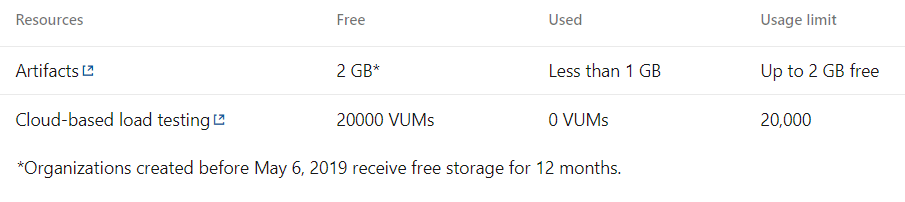
Azure DevOps Billing is through Azure and because Billing has not yet been set up we only have access up to the Free Tier limits
If you click on Set up Billing You need to choose an Azure Subscription to add it too

You cant add it to your Personal credits because of the spending Limit caps. Once set up you can then manage the paid access for your users, bearing in mind the free usage tier
Auditing
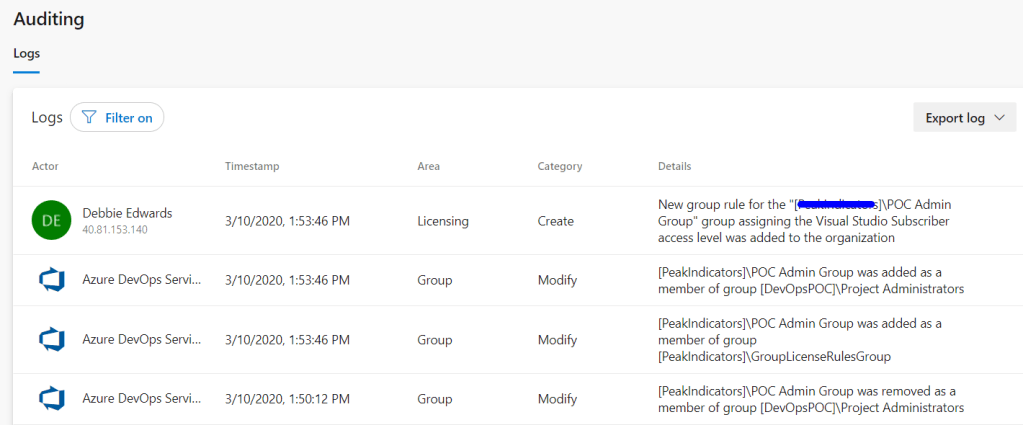
Allows you to see all the audit-able events and you can export the log and filter on specific events
Global Notifications

You will recieve notifications for lots of Actions in DevOps like when a build completes or a Deployment approval is pending. You can configure the organisation notifications from here
Usage
Usage allows you to see whats been going on in DevOps

You can also filter the information and choose your columns that you are interested in
You can Select
- TFS (Any application within the Organisation Service account, e.g. TFS https://dev.azure.com/Organisation/)
- Release Management (Any application within Release Management Service)
- Analytics (Any application within the Analytics Service)
Statuses
- Normal
- Delayed
- Blocked
And time period, for example, the last 7 days.
Extensions

You can browse the marketplace for additional DevOps Services. Like Analytics above to gain insight into the health and status of your DevOps Projects
Just Searching for Git brings up lots of free Git Services that you can use
Azure Active Directory
When DevOps was accessed, an email was used that was connected to a Tenant in Azure because we use Office 365
“Office 365 uses Azure Active Directory (Azure AD) to manage user identities behind the scenes. Your Office 365 subscription includes a free subscription to Azure AD so that you can integrate Office 365 with Azure AD if you want to sync passwords or set up single sign-on with”
Because of this, Azure DevOps connected up the Azure Active Directory

Security
Policies

If we never want to allow Public Projects we can simply set the above policy to Off.
We can also dis-allow external guest access through policies
Permissions

Project Collection Administrator Has permissions to administer build resources and permissions for the collection
A collection is a container for a number of projects in Azure DevOps and corresponds to the Organisation.
Lets set up another Project Collection Administrator

We want everyone in the POC Admin Group to also be a Project Collection Administrator

The DevOps Groups that have been created and Collection Level (Enterprise Level) Groups can all be seen here
You can also look at the users and access all the Settings per user from the User tab.
Boards
Process

Gives you more information on what will be available on the board for each type, e.g. Agile, Scrum etc.
Pipelines
Agent Pools
DevOps Pipeline Pools are scoped to the entire organisation so they can be shared across Projects. You don’t need to manage Agents individually. You can organise them into Pools


An agent is installable software that runs one job at a time.
With Microsoft hosted agents, every time you run a pipeline you get a fresh virtual machine which is discarded after use
Settings
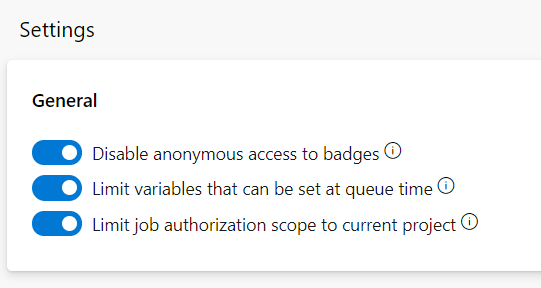
This is an example status badge in Boards

You can set variables at queue time unless the above option is enabled. Only variables Settable at queue time can be set if its limited
By default, the collection (Enterprise)-scoped identity is used, unless the Limit job authorization scope to current project is set in Project Settings > Settings.
Deployment Pools

An agent pool (Above) defines the sharing boundary for all agents in that pool. Whereas deployment Pools are about deployment target machines that have agents installed on them.
Deployment pools are convenient when you want to deploy a project to different machines
Deployment groups represent the physical environments; for example, “Dev”, “Test”, “UAT”, and “Production”.
The deployment group is a layer over the deployment pool which makes the targets available to the release definitions within a project
Parallel Jobs

As we have already established. The free tier allows you to have 1 parallel job but What is a parallel job?
A job is a set of one or more build tasks that run sequentially on the same target.
You could have for example a project that contains a web app and a Web API. They dont need to be run sequentially, they can be run in parallel to save time
Each App type can equate to 1 job within a build definition. Each build definition as its own build pool/agent
If you have two licensed build pipelines you could run them concurrently which will decrease overall build time.
You could also split up tests across jobs to be executed across parallel builds which will reduce the overall time
You need to look at your Projects and what you are building and see if Parallel jobs are relevant to you, or if you are happy for the agents to run your builds sequentially
Oauth Configurations

Register and Authorise your app
Artifacts
Storage

Check the storage sizes of your artifacts. Remember you get 2 GB free for your artifacts.
Hopefully this gives you a little more information of each sections of your organisational settings. You need to understand at a basic level
- Who your teams will be and what they will require (Set Access Levels, Groups and Rules up)
- What you will be creating and can they be built in parallel?
- what environments will you be releasing too
Each section can then be looked at in much more detail


 Debbies Microsoft Power BI, SQL Fabric and Azure Blog