After 14 years using Microsoft On Premise BI Tools (SQL Server, Reporting Services, Integration Services and Analysis Services) Its time to embrace Business Intelligence in the cloud.
Before continuing on with this project, lets look at an amendment to the lake house structure. mostly because we decided we wanted to keep the structure of the Task Flow. Instead of having one Lakehouse for Gold Silver and Bronze. We want three lake houses. One each for Bronze Silver and Gold.
3 new lakehouses are created
And now, the Notebooks need updating
Taskmaster Transformed
In the notebook.
Bronze is the main lakehouse that we are pulling the data from. But you can also add another Lakehouse.
And use the arrows to switch between the two.
The only Code that needs to be changed is when we create the Silver PARQET file (Its not Delta PARQUET at this point.
From
To
To get the ABFS path to move from Default Data Lake to another Delta Lake, right click on the destination lake and Copy ABFS Path
And we can go further, by parameterising the workspace ID and the lakehouse ID
f has been added to allow us to add parameters into the location string.
So we can now use this when we want to create a PARQET file in a different Lakehouse to the default one.
And we have introduced parameters.
Now we want to know how to do with with a Delta Parquet file moving it into the Gold Lakehouse
Silver to Gold lakehouse Delta Parquet
To
from delta.tables import DeltaTable


#You can also add the none default data lake by clicking +Lakehouse
aliased_df.write.mode("overwrite").option("overwriteSchema", "true").format("delta").saveAsTable("GoldDebbiesTraininglh.dimContestant")
And again, we clicked + and Added the Gold Lakehouse as the none default.
How can you tell which is the default?
Hover over the Lakehouse Name to get the list.
Conclusion
We have now transformed the architecture of the Lakehouse to have three Lakehouses. gold. Silver and Bronze. instead of One Lakehouse with 3 folders for Gold Silver and Bronze,
This has allowed us to see how the code changes when creating files in none default Lakehouses. And has allowed us to set up our first parameters. and it also means we can use the medallion task flow as is without having to do any amendments.
It also feels right to have more separation of the three areas.
In Part 11 we created Power BI reporting and changed the usual PBIX to a PBIP Project file.
Before moving on, lets have a quick look at a new feature in Fabric. Task Flows
Back in the Fabric Workspace
We can now build a task flow. But what is it?
Its a new workspace feature to visualise the collection of processes for an end to end solution.
There are specific types of tasks that we will look at later
There are two ways of going about this.
You have started a brand new project and you have your initial Task flow set up to start adding in tasks. This helps you work with your architecture,
You have already created tasks (Like this project) and want to assign them to a task flow.
Lets begin
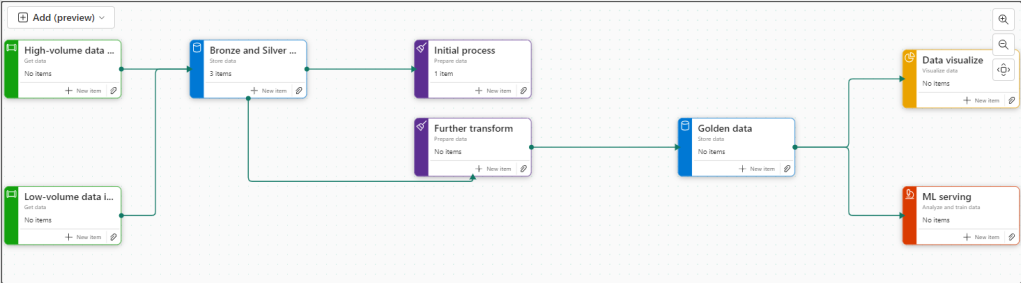
There are 8 flows available at the moment. Throughout the Fabric journey, the medallion architecture has been championed so lets go with this.
Colouring
Green Items are Get data
Blue Items are Store Data
Purple items are Prepare data
Yellow items are Visualise data
Red Items are Analyse and train Data
Creating new Tasks
If you haven’t yet started. When you set up your board. you need to assign items to each task.
There are no Data Engineering steps in this development project for getting data so lets start with the green tasks.
Click New Item
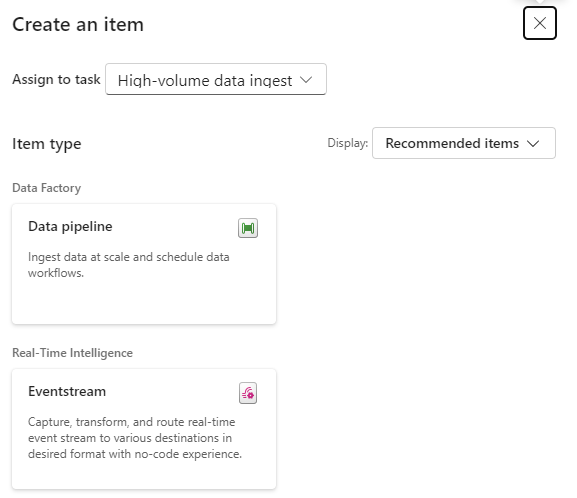
And we get options of what to create for Low Volume data. Great. We have recommended items (which we can change to all) So if you wanted to go Low code a Data Factory Dataflow Gen2 might be the way to go.
lets have a look at high volume data
Here, a Data Pipeline would probably be used for this project.
Data Factory was previously the go to for copying files across into the Data lake so as the data engineer, I would possibly pick pipelines for both types of data processing.
Already this is a great way of working. We know we need to do all these processes but the amount of possibilities can be bewildering. So let Fabric give you recommendations every step of the way.
Assigning Items to a Task
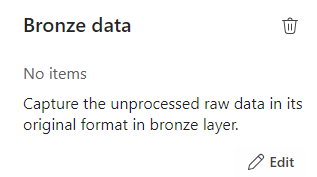
Bronze Data
If we quickly click new item to check the recommendations
We have already set up a Lakehouse for Taskmaster.
Click the little paper clip icon to attach a task
And Select the Lakehouse
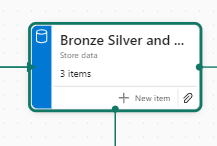
Now we have 3 items at Bronze Data Level
DebbiesFabricLakehouse Top Level
The SQL Analytics Endpoint
The semantic Model (default) This wasn’t used because there were issues with errors occurring whilst developing.
Selecting the Bronze data Task shows you the objects in that task.
Lets move on to
Initial process
We have a Data Engineering notebook set up that Creates our initial transformed Silver layer. This can be added here
One current real issue for me is the vertical bar on Fabric and Power BI
You have to go to the end to scroll down. And you can’t see your items. Extremely annoying when working on smaller screens. This is actually a large screen but you cant make the box any bigger. You have to manually make the columns smaller each time .
I hope they sort this out soon
What happens when you accidentally assign an item to the wrong task flow
I have added the Lake house to the initial Process accidentally.
Hover over the tasks and select the ones you want to remove
And Unassign from all Tasks which appears
Silver Data
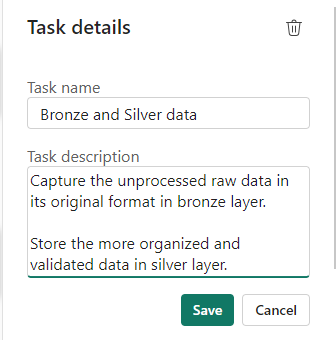
In this case the Lakehouse contains bronze and silver layer, so this is for both.
What happens when we assign the lakehouse to silver?
Well, you can’t do this. An item can only be for a single task. So how do we relate this to our medallion architecture above?
For the time being, go to Bronze Data and edit
Assign the Lakehouse
Click on Silver Data
Delete. We don’t need this
This leaves a gap in our flow
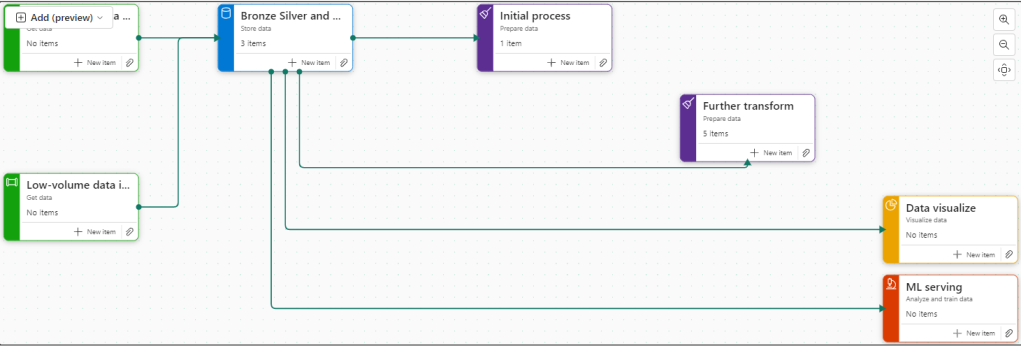
Connecting Tasks
Click the edge of the starting task and join to the end task
Further transformation
We have Notebooks that prep the dims and facts. Lets add them
Golden Data
Another Data Store and again our golden data is in Delta Parquet in the Lakehouse. Looks like we can edit the initial Store data again
Mini gripe. You can’t see all of the information so you cant tell its bronze silver and gold.
Delete Golden Data
Personally I would prefer to have all three on the pane and share the Data lake between all three tasks.
But where do we add the semantic model?
The Semantic model comes before visualising the data. But we have nowhere for this.
Creating paginated reports and semantic models from a task isn’t supported.
Well this is a real shame. it feels like this needs to be added before its a really usable solution.
Data Visualise
Our report is in a PBIX File.
We don’t have any Dashboards
Lets publish the Content from Pbix to the Fabric Workspace.
Then go back to the workspace
Interestingly these are now uncommitted items and show up in source control.
In Part 10 we did a lot of work getting the PBIX file into source control. What will this do? we will look at this later.
Back to Data Visualize
We add the reporting
The Semantic Model has also been added here, Hopefully a new task will be added soon specifically for the semantic model, there are currently no items types for semantic modelling.
There is no ML Service so we could get rid of this task.
Old Notebooks not being used (Filters).
There are a few Notebooks from the old version not part of this, can we see them?
Another issue. Selecting Not Specific for Task doesn’t filter the Tasks without a Task Specified. Something else that needs to be ironed out.
Conclusion.
There are currently a fair few issues with this but it is new and hopefully they will get ironed out.
I still don’t like scrolling in any of the Power BI / Fabric Service solutions because it doesn’t automatically resize to page size. This has been an annoyance for a long time now. I really wish it would get sorted.
Semantic modelling needs to be added. Filtering needs to be much better,
And I genuinely wish you could have an item in multiple tasks, especially store data. But overall I really love this feature and can’t wait to see if get some more development











 Debbies Microsoft Power BI, SQL Fabric and Azure Blog